Companion Apps
Two desktop applications extend Foxlogi outside the browser: Stockpiler, which keeps your stockpile data current without anyone lifting a finger, and the Overlay, which puts your logistics tasks on top of the running game.
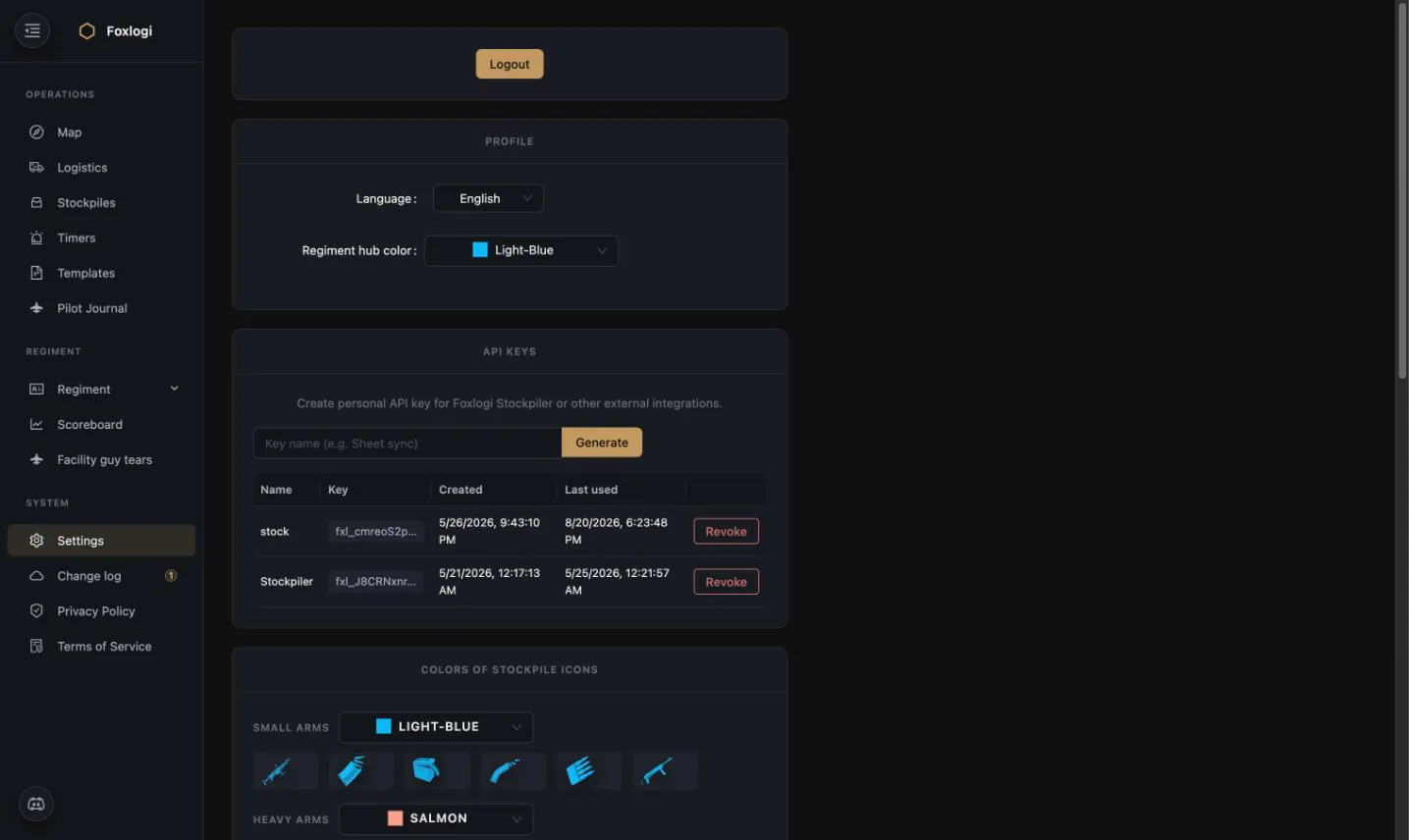
Both authenticate with a personal API key generated in Settings → API keys.
Foxlogi Stockpiler
The problem it solves: every number in Foxlogi depends on knowing what your stockpiles actually contain, and keeping that current is tedious. Even with clipboard paste, someone has to remember to do it at every depot, every time. In practice the frontline pile gets updated constantly and the backline reserve goes stale for days — which is exactly backwards, because the planner needs the backline numbers to decide what to produce.
What it does: Stockpiler is a small cross-platform desktop app that watches Foxhole's
Unreal Engine save files (.sav). Whenever the game writes one, Stockpiler parses it,
extracts the stockpile data, and posts it to Foxlogi over HTTPS.
┌──────────────────┐     ┌──────────────────┐     ┌──────────────────┐
│  Foxhole .sav    │────▶│   Stockpiler     │────▶│     Foxlogi      │
│  (save file)     │     │  parse + extract │     │  (API + key)     │
└──────────────────┘     └──────────────────┘     └──────────────────┘
     file changes            native watcher            HTTPS + fxl_ key
Setup is two fields: paste your API key, pick the .sav files to watch. It remembers both
between launches and runs in the background from then on.
| Platforms | Windows, macOS, Linux |
| Built with | Tauri (Rust core, minimal HTML/CSS/JS UI) |
| Watching | Native OS file watchers — changes detected instantly, no polling |
| Multiple files | Watch as many save files as you need at once |
| Updates | Checks on startup and self-updates after you confirm (Windows/macOS/Linux AppImage; .deb/.rpm update manually) |
| Security | API key stored locally, transmitted only over HTTPS |
It syncs more than stockpiles. Anything you pin on the map in game comes across too:
- Bunker bases are created if Foxlogi doesn't have them yet, with the tier read from the structure, set public, at a 1× supply multiplier.
- Supply tunnels are created and their stock kept current — this needs Senior Member or above, and a newly created tunnel arrives with a placeholder consumption rate that somebody has to replace with the real burn rate before its countdown means anything.
- Timer markers are not covered — squad-locked ships, tanks, cranes and mines still have to be created and refreshed in the app. See Timers.
So a member running Stockpiler and pinning bases as they drive past is quietly building the regiment's map for everyone.
Why it matters: with Stockpiler running on a few members' machines, the Logistics Planner stops being an estimate and becomes an accurate read of the regiment's real inventory. The difference in task quality is substantial — the planner can only be as good as the stock data underneath it.
Downloads: foxlogi-stockpiler-x.x.x-setup.exe (Windows), .dmg (macOS), .AppImage
(Linux).
Foxlogi Overlay
The problem it solves: Foxhole is played fullscreen, and alt-tabbing to a browser to check what you're supposed to be doing is friction that ends with people not checking. Worse, the information you need is time-sensitive and situational — which crates do I load right now, at this depot, in this truck?
What it does: a transparent, always-on-top overlay drawn on top of the game with three panels:
- Logistics — transport / craft / refine / MPF tasks from the planner, claimable and completable in place
- Bunker Supply — find a bunker by name and run its supply task through pickup and delivery
- Pilot Missions — log sorties, kills and counters for the Pilot Journal
How it behaves in game
- Click-through by default. The game gets the mouse. Moving the cursor over an overlay control makes the overlay interactive; moving off it hands the mouse back after a short grace period. You never lose control of the game to the overlay.
- Three safe zones — a top banner, a left panel and a bottom strip, sized as fractions of your display. The screen centre stays clear for Foxhole's own inventory UI.
- Collapsible to a small launcher button when you want the screen back.
- The game must run in borderless windowed mode — exclusive fullscreen bypasses the desktop compositor and nothing can draw over it.
Hotkeys
| Default | Action |
|---|---|
Alt+X |
Show / hide the overlay UI |
Alt+Shift+S |
Ingest a stockpile from the clipboard — open a stockpile in game, copy it, press the hotkey. The overlay parses the export and posts it to Foxlogi. |
Both are rebindable in the overlay's Settings drawer, which also picks the target display, toggles hardware acceleration, and disconnects (clearing the stored key).
That second hotkey is the one people notice: it makes updating a stockpile a one-keystroke action without leaving the game, which is the closest thing to zero-friction inventory management short of running Stockpiler.
Security model
The overlay is deliberately conservative with your API key:
- All backend HTTP runs in the app's main process, never in the UI layer. The raw key never enters the renderer, the DOM, or devtools.
- The key is stored encrypted via the OS keystore (Keychain / DPAPI / libsecret). Where no keystore exists, it is kept memory-only rather than written as plaintext.
- The UI can only call an enumerated set of operations — never arbitrary URLs.
- A
401anywhere clears the stored credentials and prompts you to reconnect.
| Platforms | Windows, macOS, Linux |
| Built with | Electron + React, Ant Design |
| Updates | Automatic via electron-updater |
| Packages | NSIS installer + portable (Windows), dmg + zip (macOS), AppImage + deb (Linux) |
Getting started with either app
- In Foxlogi, open Settings → API keys
- Enter a name (e.g.
StockpilerorOverlay) and press Generate - Copy the key (
fxl_…) and paste it into the app - Revoke it from the same page whenever you want access to stop
Because keys are personal, work done through them is credited to you on the Scoreboard and recorded in the Action Logs — the companion apps are first-class clients, not a side channel.