Logistics Planner
The core of Foxlogi. One request at the frontline becomes a complete, ordered work queue for the whole regiment — transport, crafting, refining and Mass Production Factory orders — recalculated continuously against what your stockpiles actually contain.
What problem it solves
Frontline supply is a chain, and every link is someone else's job:
The trench needs rifles → the frontline depot is empty → the midline depot has none either → nobody has crafted any → the factory has no basic materials → nobody refined any salvage.
Working that out by hand takes a logi officer twenty minutes and a spreadsheet, and it has to be redone every few hours as stock moves. Most regiments simply don't — so people default to "craft whatever, haul it somewhere", and the front runs dry on the one item nobody thought about.
Foxlogi does the whole derivation automatically and continuously, then hands each step to a member as a claimable task.
Step 1 — Declare your supply chain
Open a storage depot or seaport on the map and choose Setup.
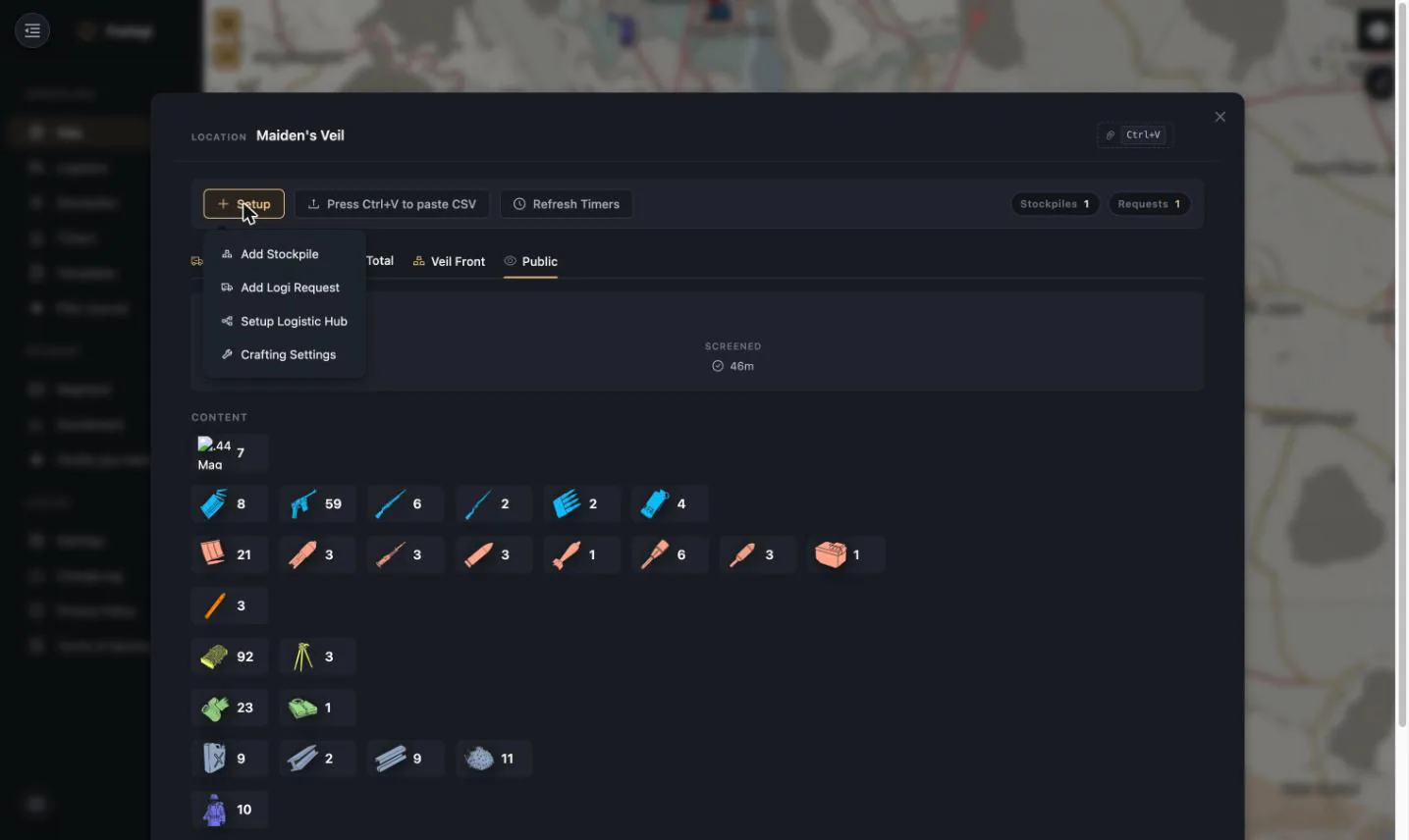
Setup Logistic Hub turns that in-game location into a node in your chain:
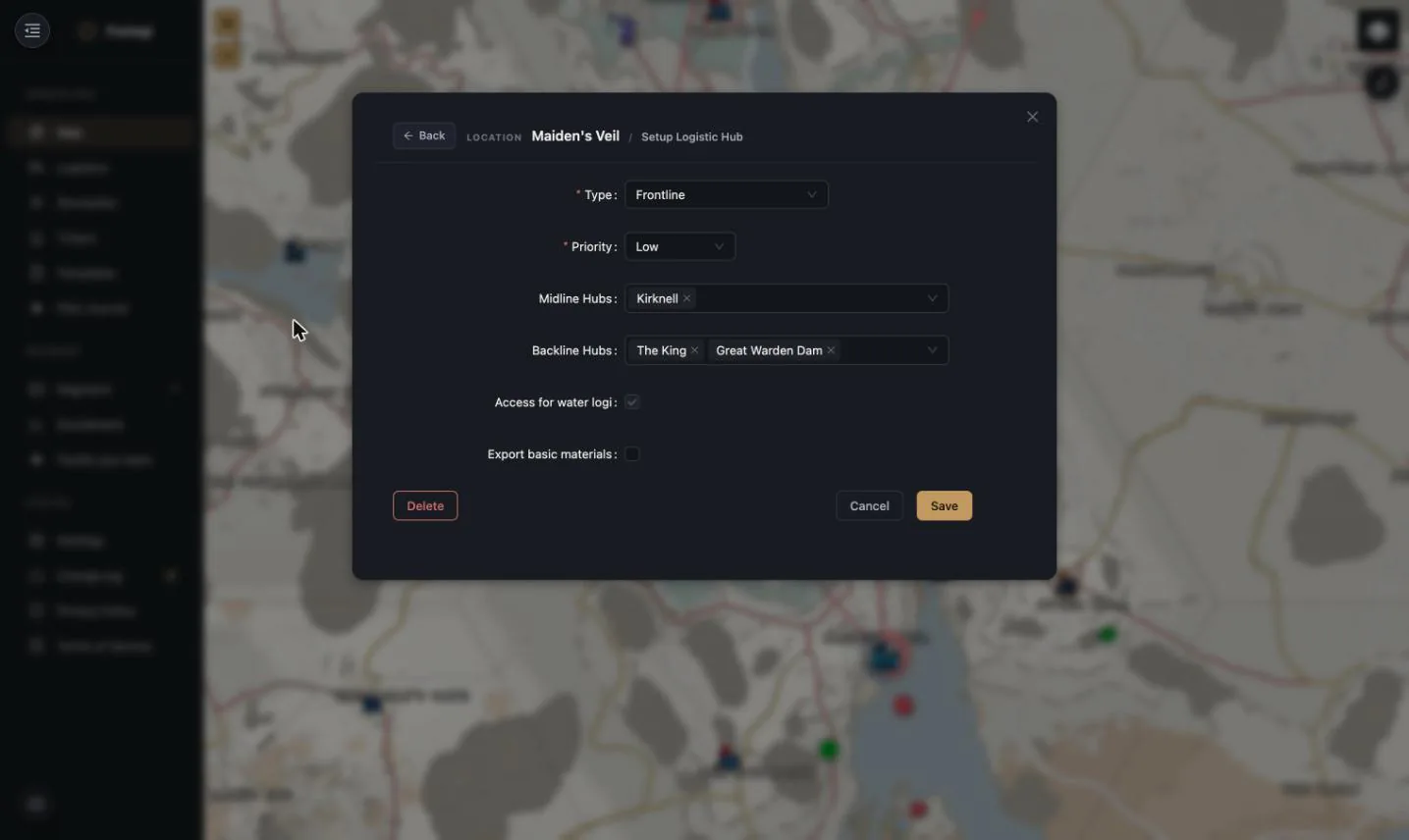
| Field | Meaning |
|---|---|
| Type | Backline / Midline / Frontline — the node's role in the chain |
| Priority | Low / Medium / High — which frontline gets served first when supply is tight |
| Midline Hubs | Which midline depots feed this one |
| Backline Hubs | Which backline depots feed those |
| Access for water logi | The hub can be reached by barge/freighter, not just by road |
| Export basic materials | Whether refined bmats/rmats may be shipped out of this hub |
That's the entire topology. Foxlogi derives the supply arcs on the map and every transport route from these links.
What the hub type actually changes
The type is not a label — it changes which work the planner will generate at that hub. It is worth knowing exactly what it does, because the effects are narrower than people assume:
| Backline | Midline | Frontline | |
|---|---|---|---|
| Can pull from | nothing | backline hubs | midline and backline hubs |
| Crate production needs | 1+ factory on site | 2+ factories on site | 2+ factories on site |
Two things that are commonly assumed to follow from the type, and don't:
- MPF ordering is not a Backline privilege. It's a per-hub toggle that only appears where the location actually has a Mass Production Factory, whatever tier you called the hub.
- Exporting raw materials is not a Frontline restriction. What governs it is the Export basic materials flag together with whether the location is a refinery and how many factories it has.
Type constrains inbound supply — who a hub is allowed to draw from — rather than forbidding anything from leaving. Beyond that, one rule is genuinely type-scoped: a higher-priority backline hub will pull refined materials from a nearby lower-priority backline hub, so your main production site drains the overflow sites instead of both sitting half-stocked.
Crafting settings
Setup → Crafting Settings controls what each hub is allowed to produce, per item, with separate toggles for Factory, Mass Production Factory and Facility production:
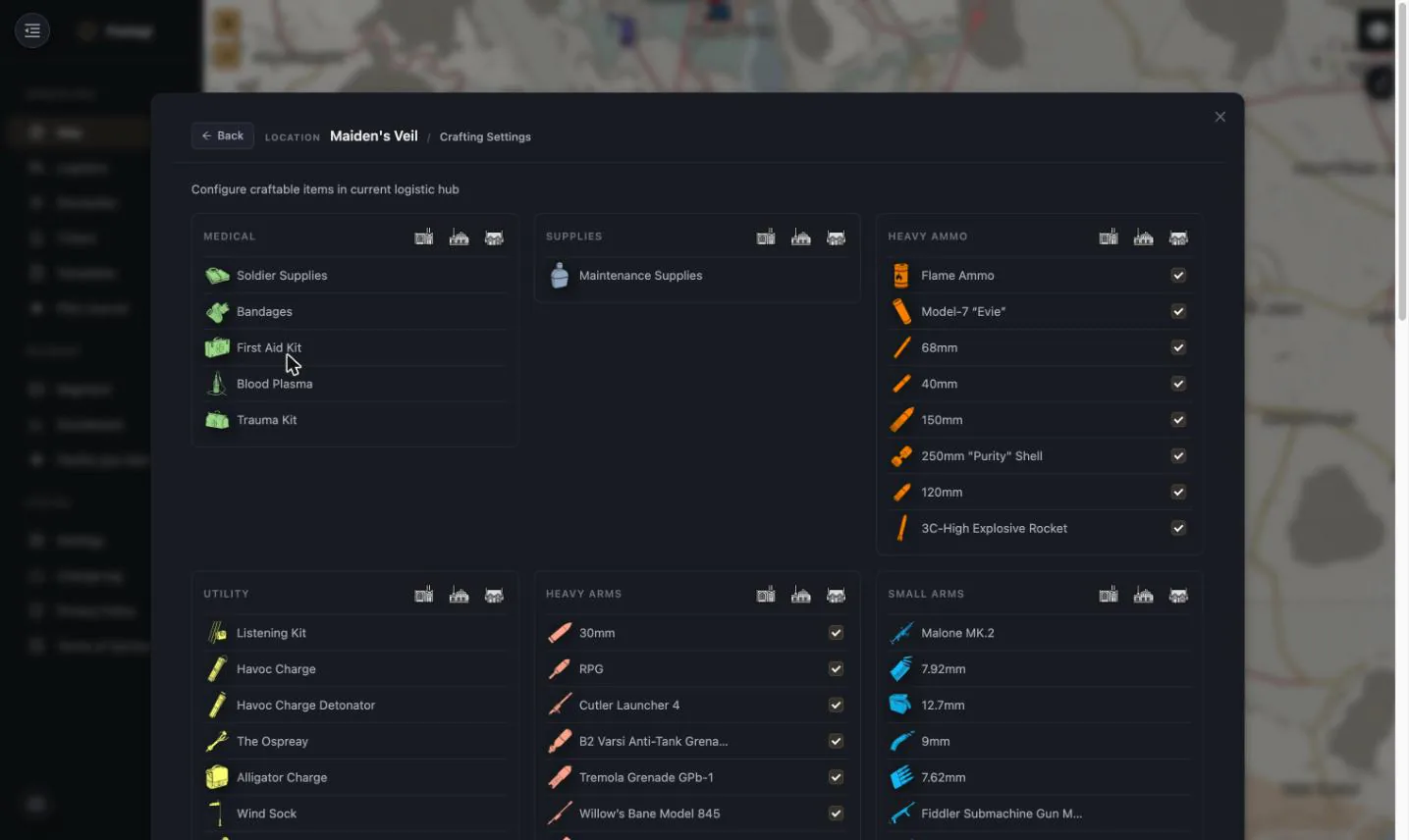
This is how you stop the planner suggesting things that don't make sense at that location — no 250 mm shells at a hub with no facility, no MPF orders at a hub without an MPF.
Step 2 — Post a request
Setup → Add Logi Request creates the demand signal.
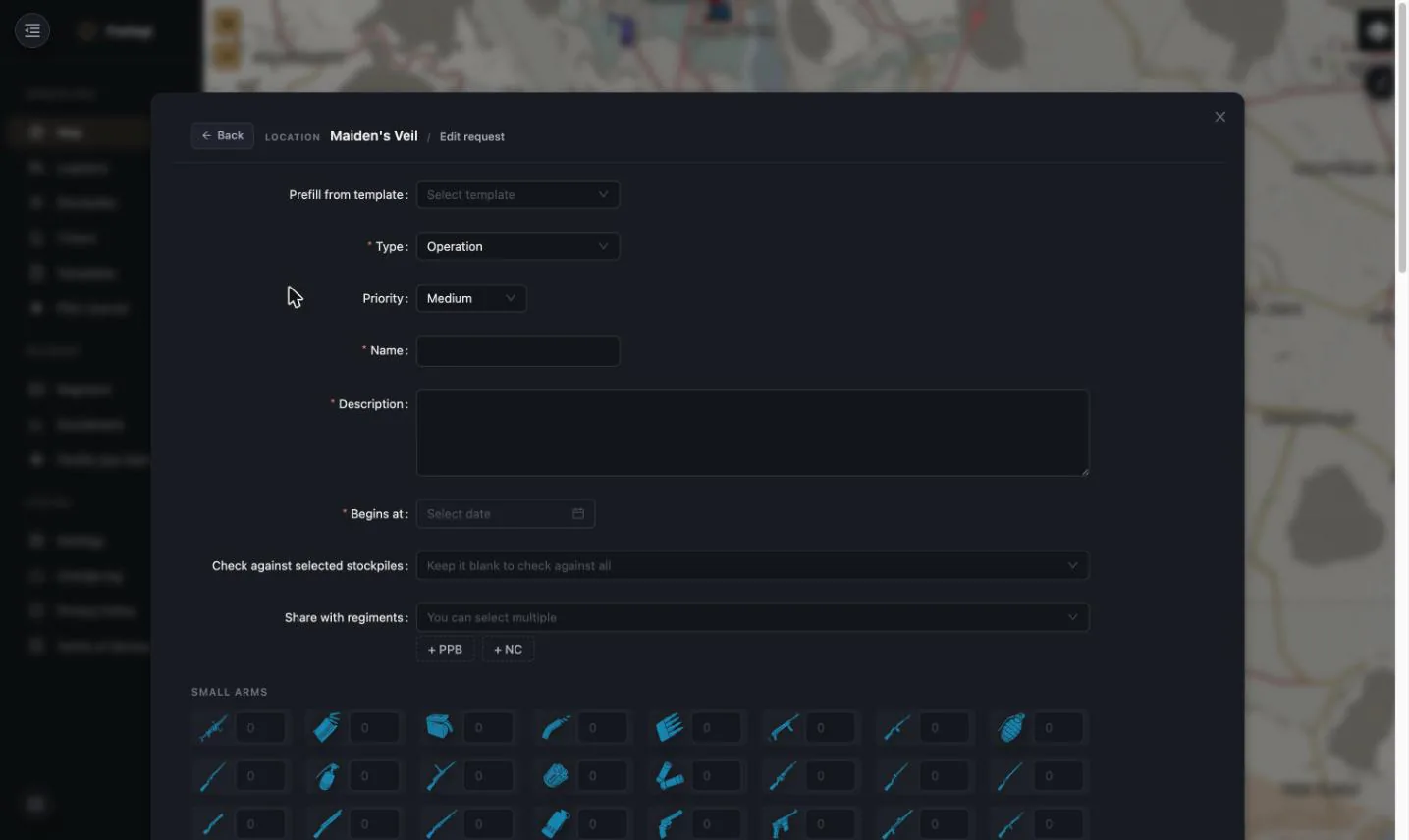
| Field | Meaning |
|---|---|
| Prefill from template | Load a saved loadout — see Request Templates |
| Type | Permanent (standing top-up, one per location) or Operation (one push, named, with a start time) |
| Priority | Low / Medium / High |
| Begins at | When the request goes live — schedule an op ahead of time |
| Check against selected stockpiles | Restrict "do we have this?" to specific depots; blank = check all |
| Share with regiments | Let allies see and help fulfil it. + NC shares with the whole coalition in one click |
Then set quantities on the item grid, category by category.
A permanent request is the workhorse: "Maiden's Veil should always hold this loadout." It never completes — it just keeps generating work whenever the front burns through stock.
Two rules worth knowing before you plan a war:
- One permanent request per location. Once a location has one, the option disappears from the Type dropdown; edit the existing request instead of adding a second.
- Operations stack, permanents don't. Several operation requests at the same location have their quantities added together, so two ops each asking for 50 rifles produce a task for
- A permanent request is treated as a floor instead — the planner takes the largest figure rather than summing it, so it never inflates itself.
Creating or editing a request requires Officer or above.
Step 3 — Read the gap
Click the depot again and the request tab shows the state of the world.
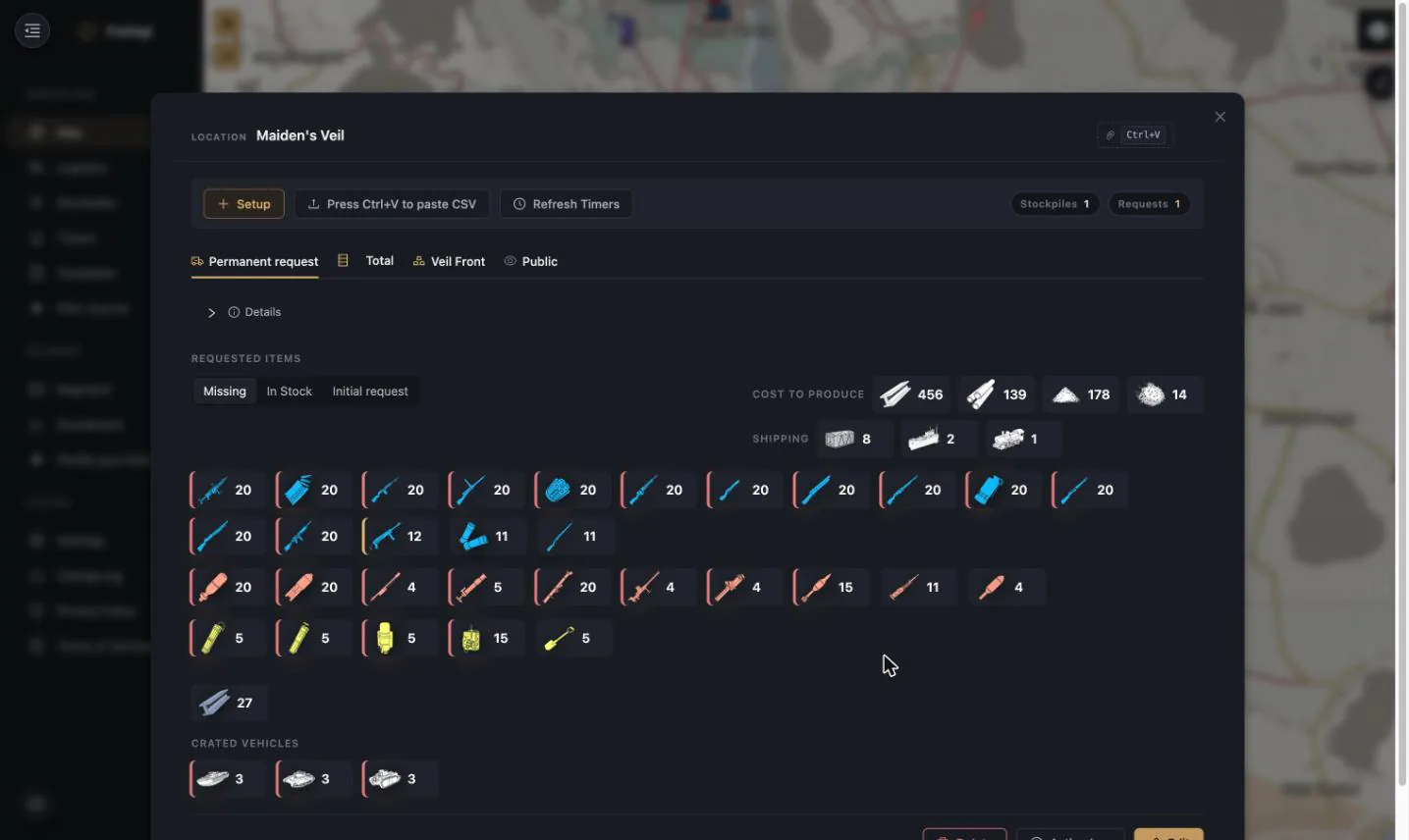
- Missing / In Stock / Initial request — toggle between what's still needed, what's already there, and what was originally asked for.
- The Missing view ranks itself. Items are re-ordered so the one you have least of comes first, and the worst are flagged with a coloured edge: red when more than 80 % of the requested amount is missing, amber above 60 % missing, nothing below that. You can read the state of a request from the first three icons without counting anything.
- Cost to produce — the raw materials the missing crates would consume (basic materials, refined materials, explosive powder, heavy explosive powder). This is the number that tells you whether the request is realistic.
- Shipping — how many shipping containers, flatbeds and freighters the missing stock will take to move. Instantly answers "is this one truck run or a barge convoy?"
- Crated vehicles — vehicle crates tracked separately from supplies.
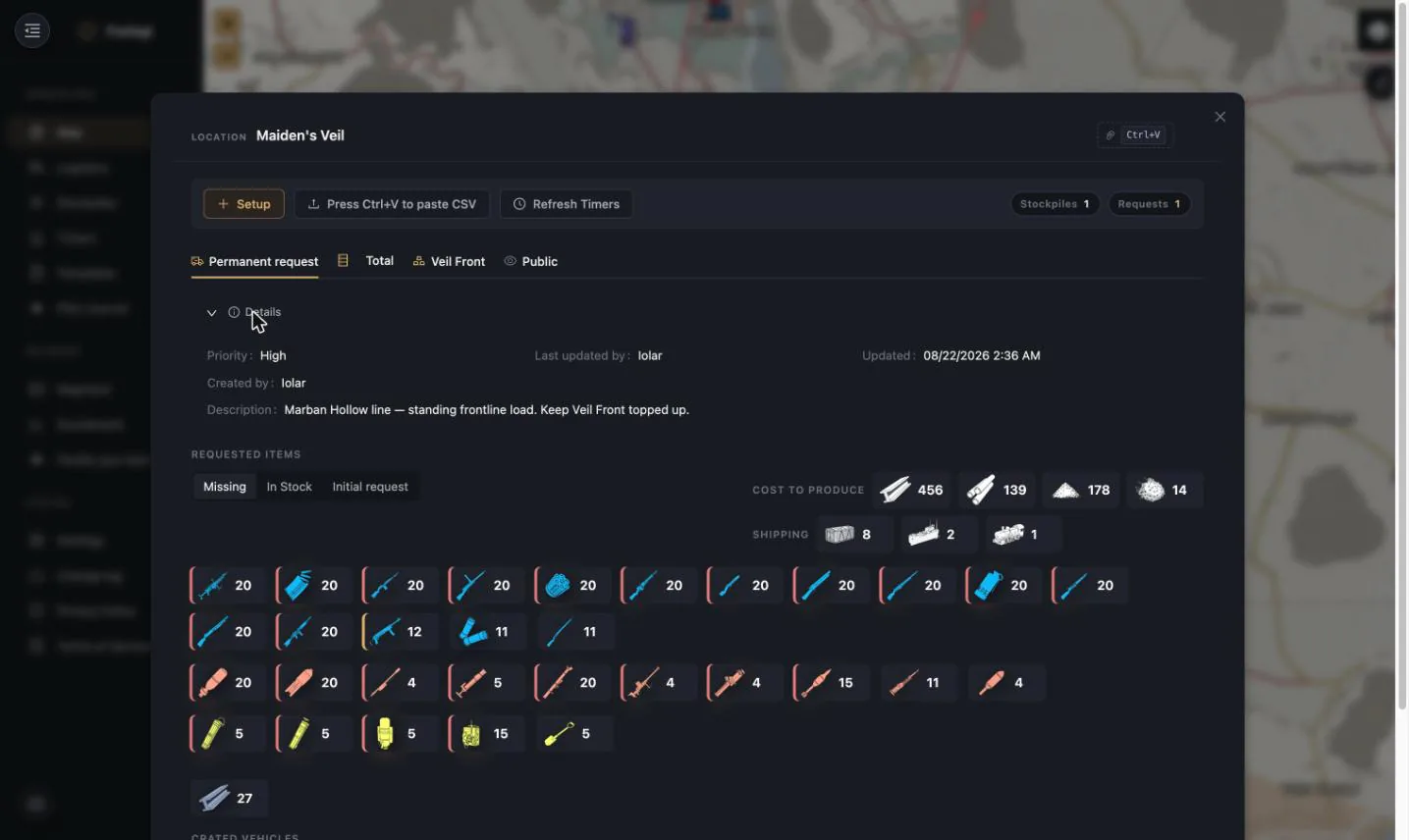
Expanding Details shows priority, description, author and last update:
Step 4 — Work the board
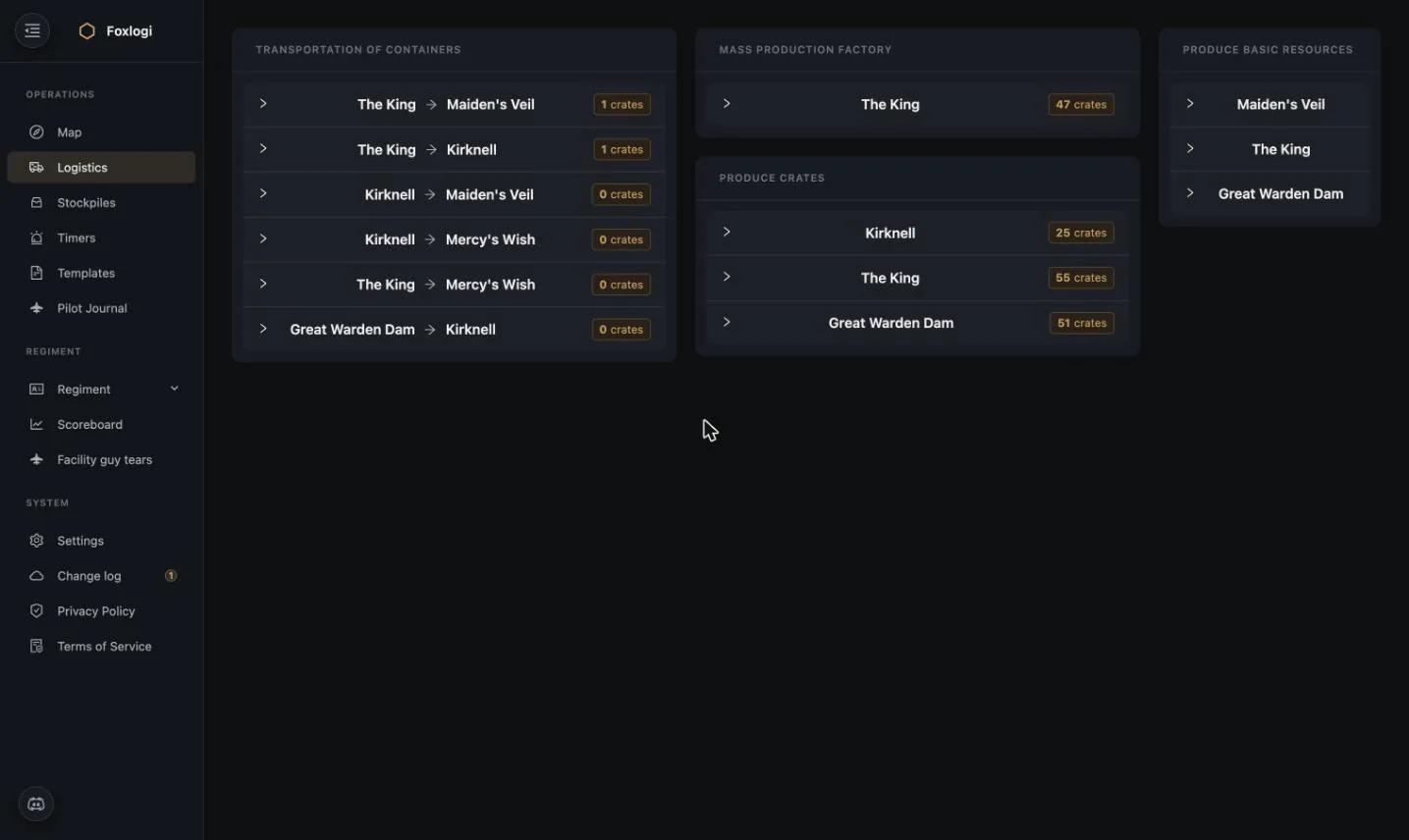
The Logistics page turns all of that into claimable tasks, grouped by kind.
Transportation of containers
Routes with a crate count: The King → Maiden's Veil, Kirknell → Mercy's Wish. Expanding a
route shows exactly which crates to load. A 0 crates row means the route is wired up but
currently has nothing to move — the chain is healthy there.
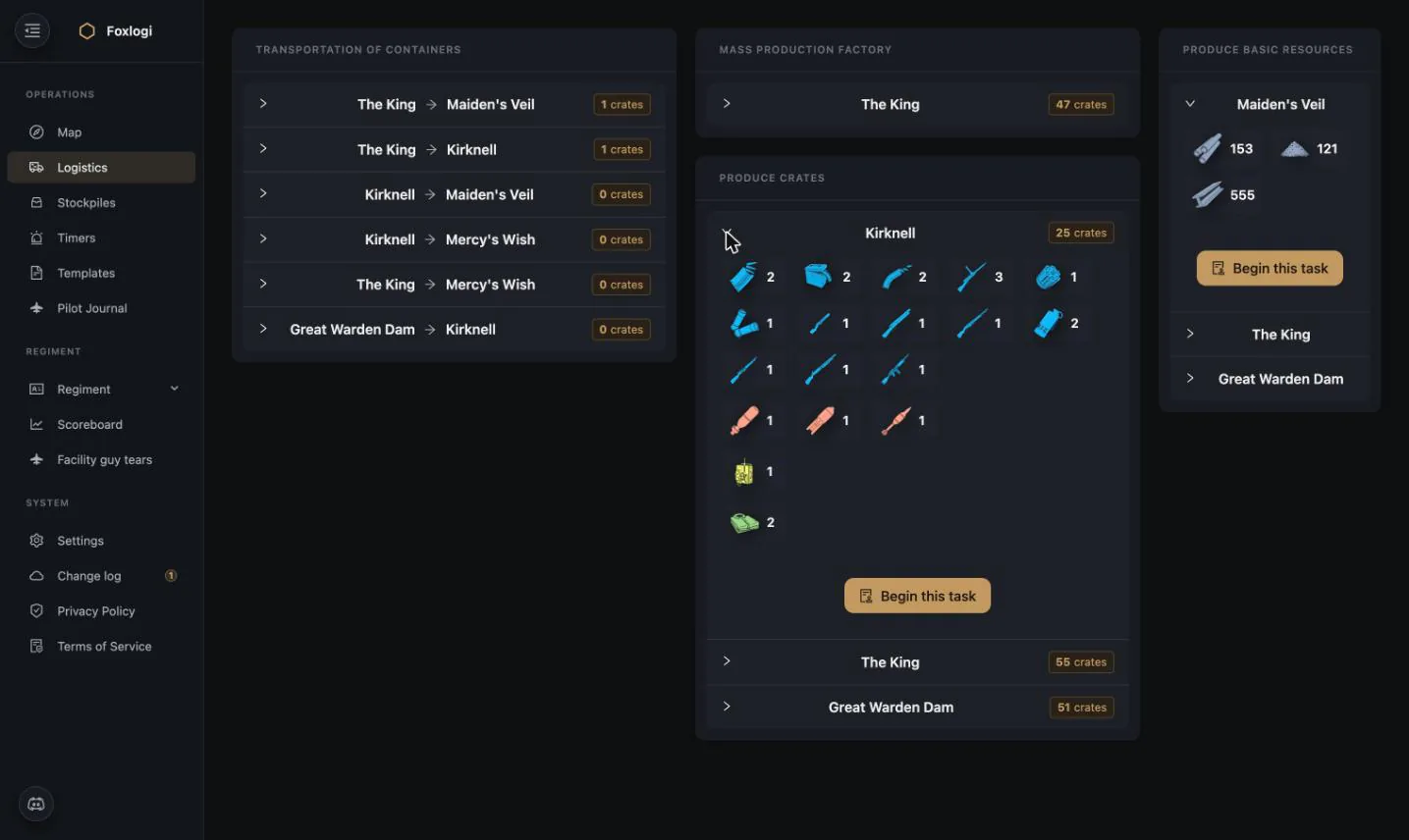
Produce crates & Produce basic resources
Per-hub production tasks. Expanding shows the item list and, for refining, the raw resource quantities:
Claim and run a task
Begin this task opens a task runner:
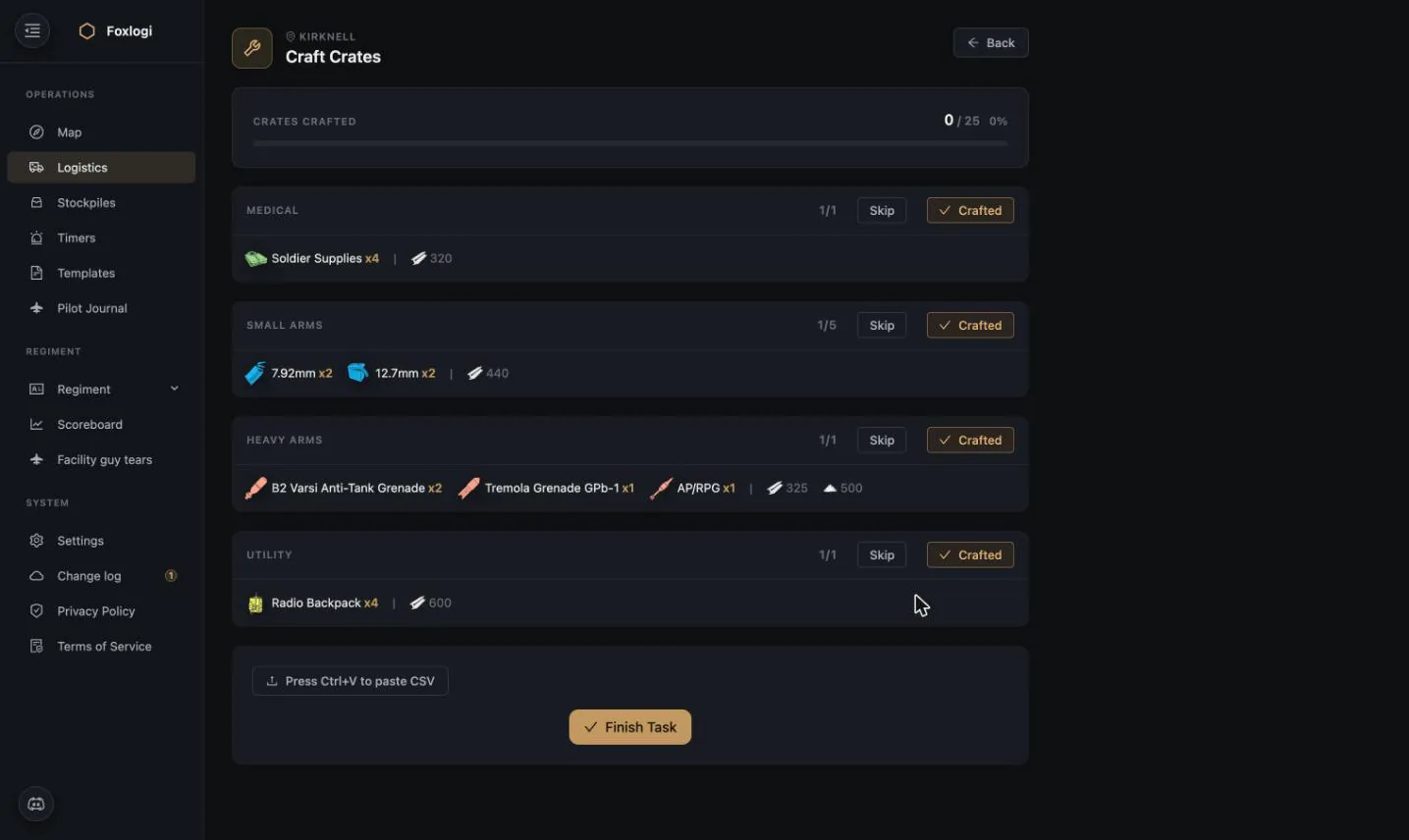
- A live progress bar (
0 / 25 crates) - Batches grouped by category, each showing its material cost — 4× Soldier Supplies costs 320 basic materials
- Skip / Crafted per batch, so a partially-finished task still records what got done
- Press Ctrl+V to paste CSV — dump the stockpile straight from the game to auto-verify
- Finish Task — awards logi points and removes the work from everyone else's board
Paste an updated export of the receiving stockpile before finishing: that's what verifies the work and what the score is calculated from.
Because tasks are claimed, two people don't craft the same 25 crates by accident.
Refining: corrections and shared credit
The Produce basic resources runner has two controls the others don't:
- Correct — opens a direct editor for the raw and processed material quantities on the task. Refinery queues get interrupted, someone hauls half a load away, the numbers drift; this fixes them without abandoning the task and starting over.
- Participants — search a regiment member and Add them to the task. A refining shift is usually several people feeding the same refinery, and this is how they all get credited. The points are split evenly across everyone on the task, with the person who ran it keeping an extra 30 % share. Transport tasks split the same way.
Mass Production Factory queue
MPF work has its own flow, because MPF orders take real hours and are queued per player squad.
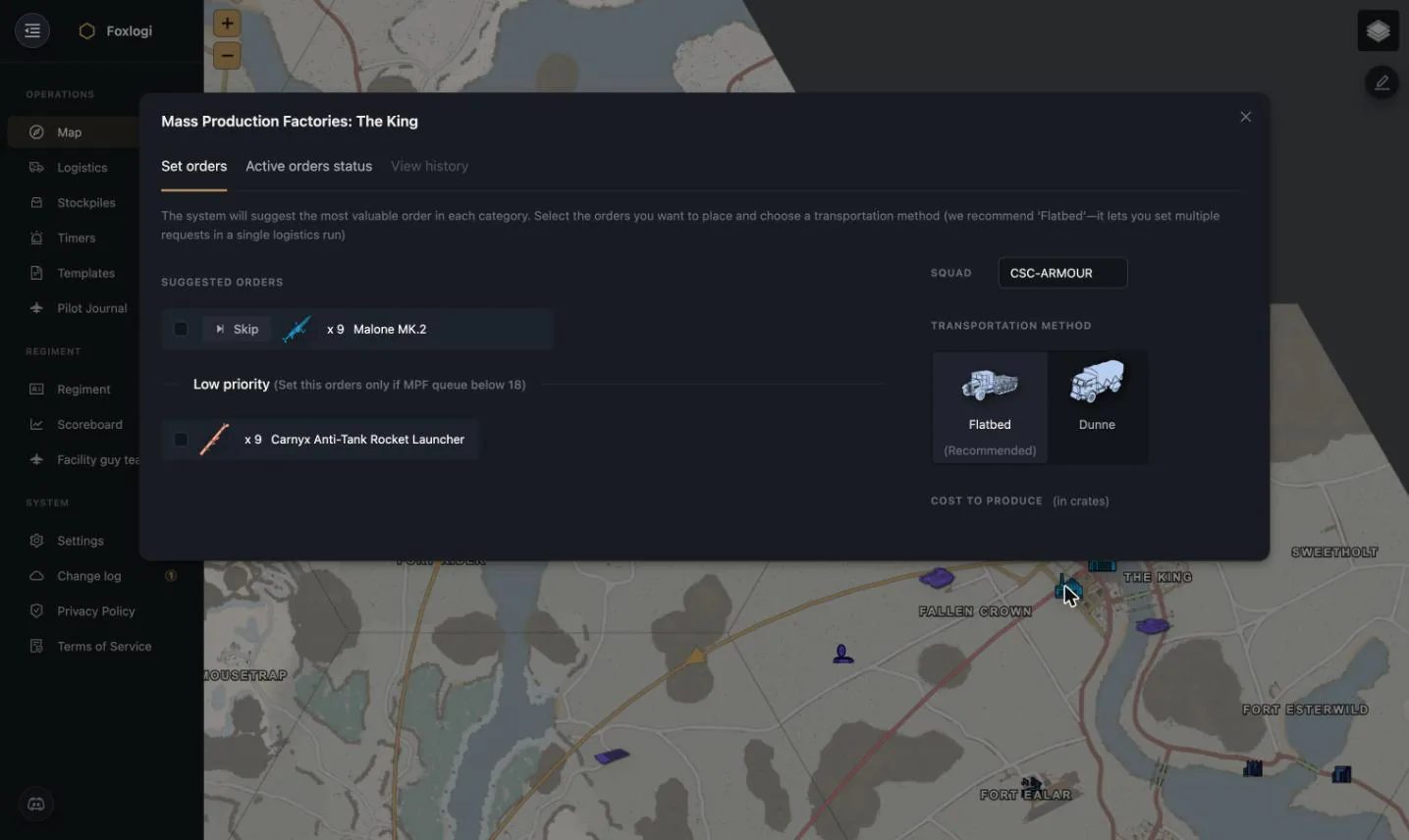
Foxlogi suggests the most valuable order in each category based on the outstanding requests, then lets you:
- Tick the orders you want to place, Skip the ones you don't
- Set the Squad the order is queued under (so the right people can collect it)
- Choose a transportation method — Flatbed is recommended because it lets you place several orders in a single logistics run
- See the cost to produce in crates before committing
A Low priority section holds orders that should only be placed if the MPF queue is short — it keeps cheap filler from blocking urgent production.
Tracking production
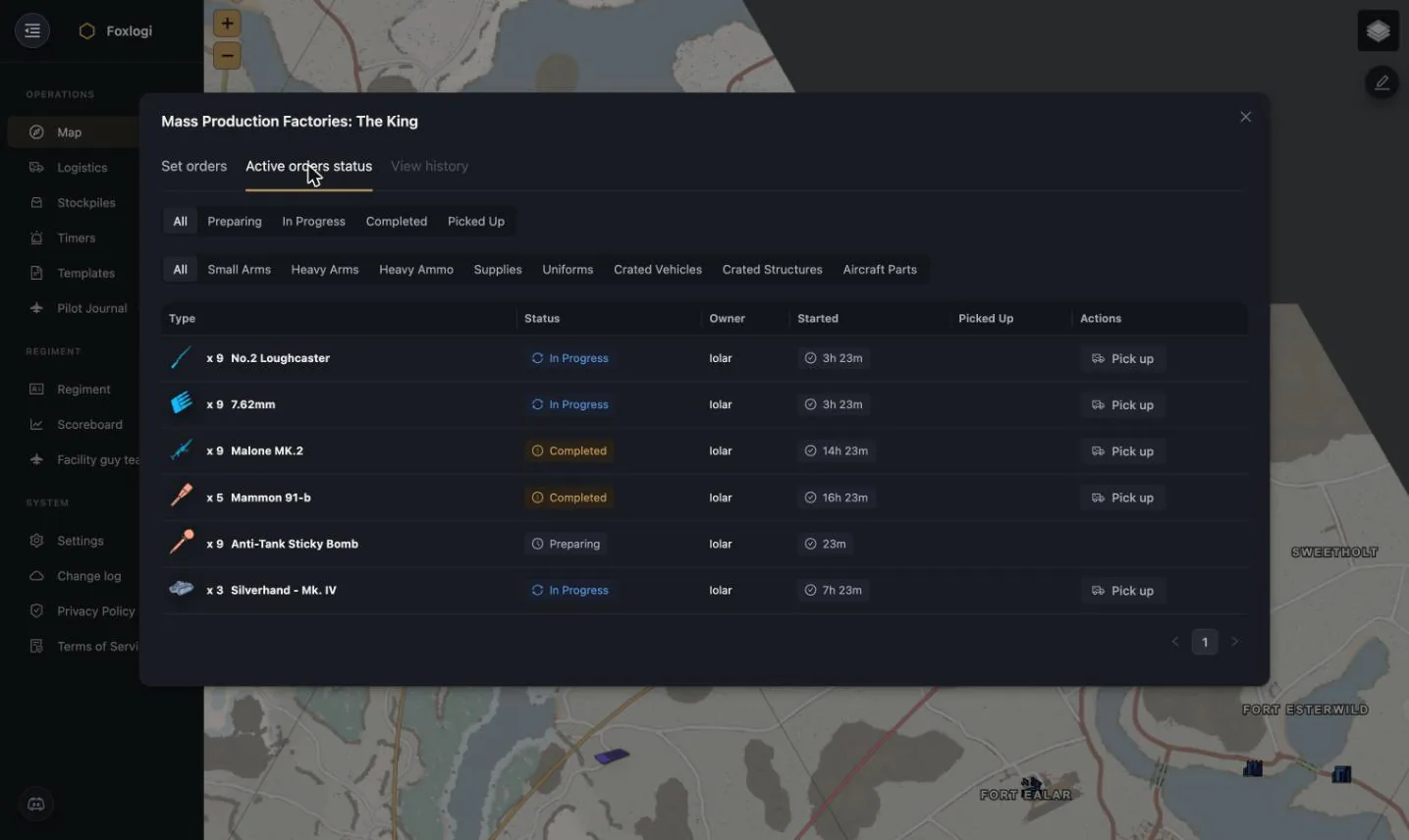
The Active orders status tab tracks every order through Preparing → In Progress → Completed → Picked Up, with filters by status and by category, who placed it, when it started, and a Pick up action. Orders that sit too long are aged out automatically by the hourly maintenance job, so the queue doesn't fill with ghosts.
What makes the planner trustworthy
- It reads real stock. Every number comes from actual stockpile contents, kept current by clipboard paste, CSV, or the Stockpiler app.
- It respects hex ownership. Hubs in hexes your faction has lost stop producing tasks.
- It respects your rules. Crafting settings, water access, and export flags all constrain what it will suggest.
- It's shareable. A request shared with an allied regiment shows up on their board too — the basis of the logistics marketplace planned next.
- It's visible in-game. The Overlay app puts this same task board on top of Foxhole, so you don't alt-tab to find your next job.